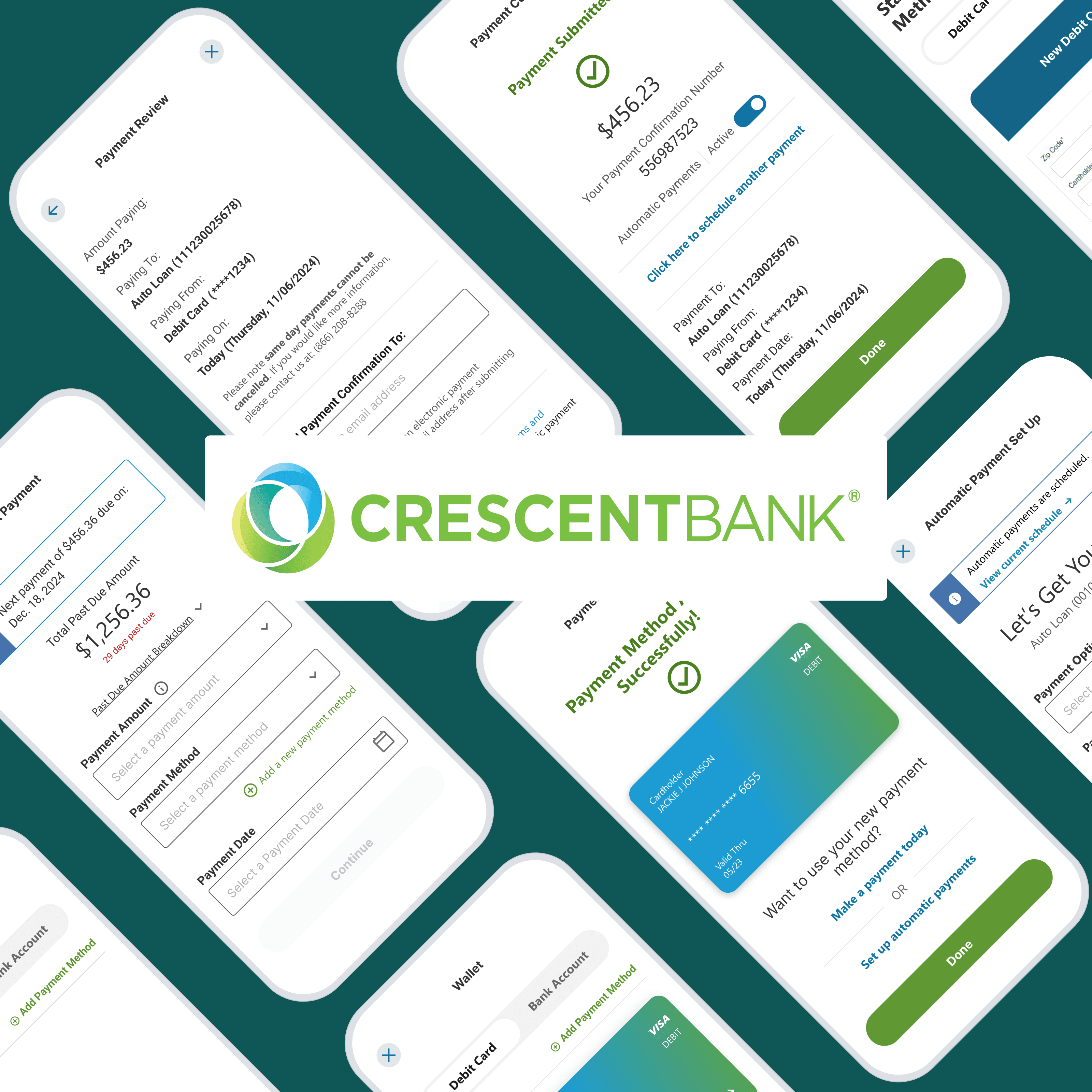
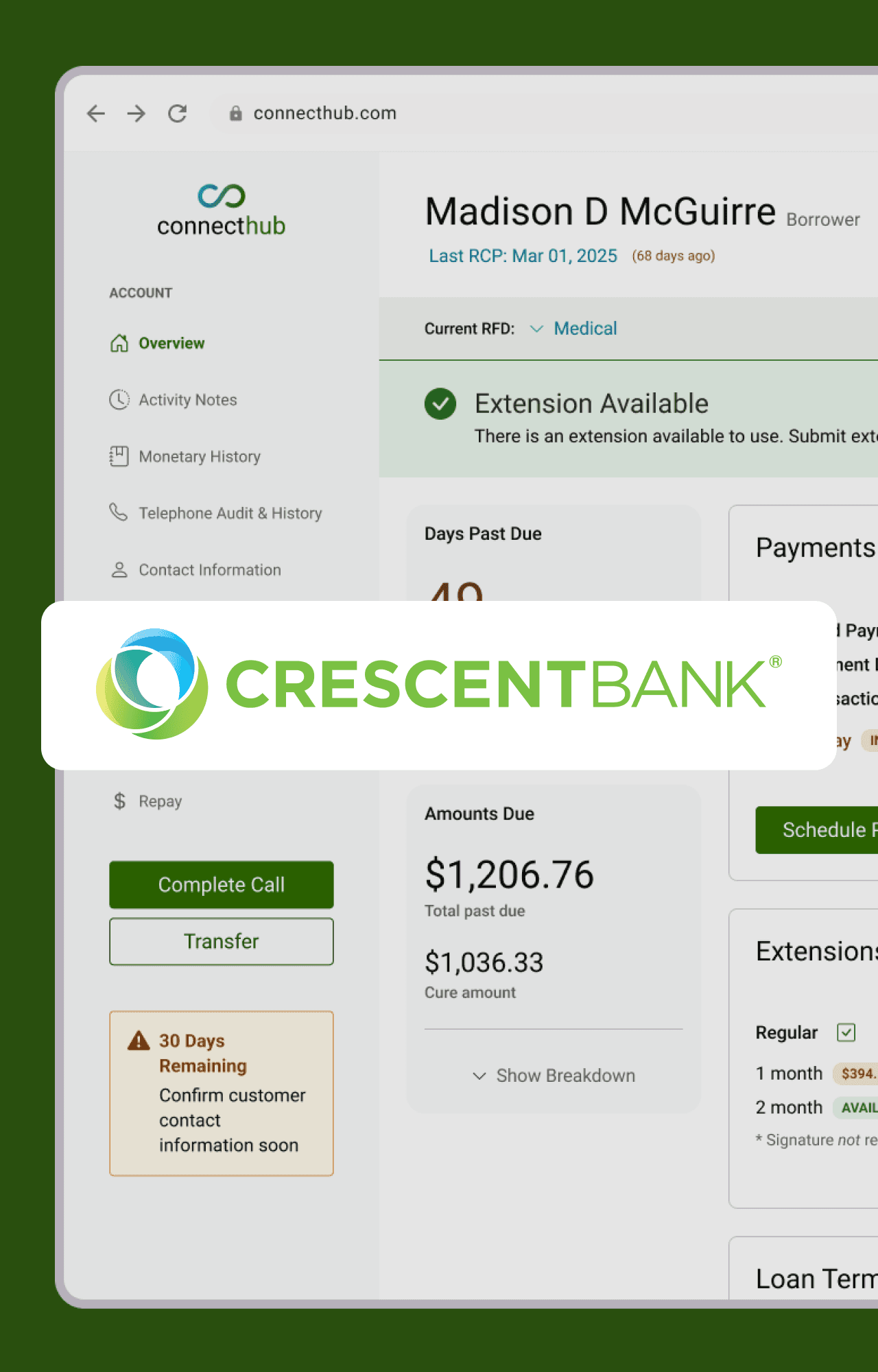
Shipped a 4.9-Rated Mobile App in 16 Weeks
How I designed Crescent Bank's first mobile experience — and helped shift their culture to user-first thinking
ROLE
Lead UX Designer
YEAR
2022
TEAM
3 Developers | 1 Product Manager | Myself
Summary
Crescent was falling behind competitors — their payment portal felt disjointed, customers couldn't see fee breakdowns, and they had no mobile app for self-service.
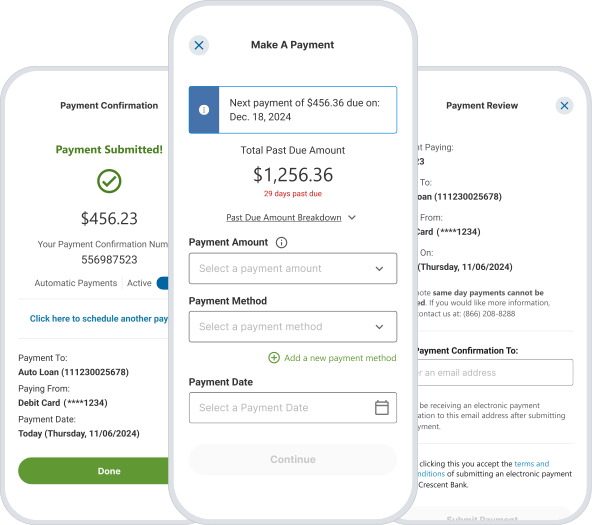
As lead UX designer, I designed a cohesive 3-page payment flow and four mobile widgets that made payments transparent, intuitive, and fast. I worked around technical constraints (a vendor iFrame) to create an experience that felt native to Crescent. Shipped in 16 weeks with a 4.9-star rating, the project also sparked a culture shift toward user-first thinking.
Impact
No App Previously
4.9
Apple Store rating with 1.7k ratings given.
Current Design Not Impactful
Customers switched from legacy portal to mobile app in 2 months.
UX Not Involved
3
Additional projects and features requested design early.
CHALLENGE
Four Months to Shine
Launch Crescent's first mobile app and retire the legacy portal in 4 months
There was a lot of pressure for everyone to get this project moving and completed.
Stepping into the project with a team that barely knew each other, multiple developers coming from college, and little to no UX research present, a starting point seemed like a needle in the haystack.
DISCOVERY
Discovering the Gaps
What was and wasn't working?
To kick things off, I started by meeting with product managers, who handed me a mix of PowerPoints, Word docs, and even some rough-draft design attempts.
These became my first hints into what customers expected, and where the experience fell short.
Identifying a critical issue
However, I wanted to dig deeper and understand the customer's frustrations, but with a small, predefined budget, interviews were out of the question.
So I decided to opt for watching call service recordings to help empathize with our customers. After hours of listening, I found several issues - payment sync problems (backend), auto-pay visibility gaps, and a critical UX issue:
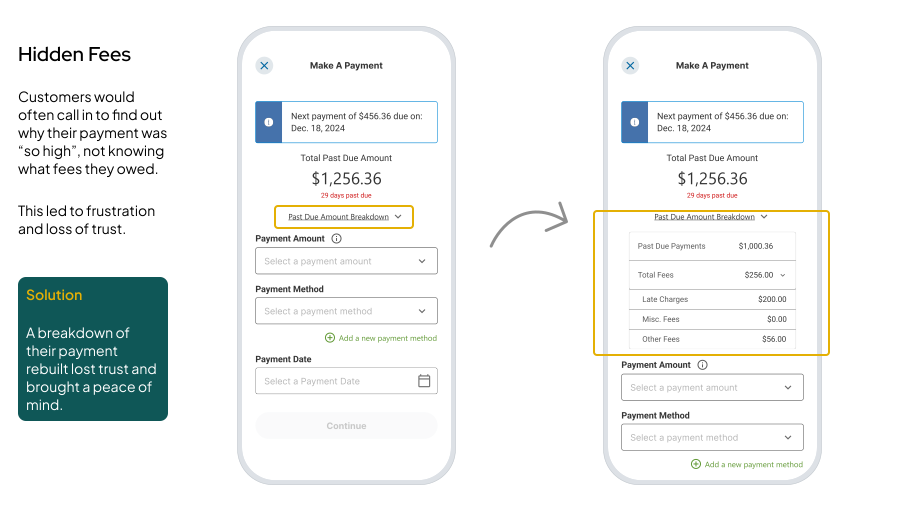
Customers couldn't see fee breakdowns leading to confusion and support calls about charges.
With a 4-month timeline, I focused on solving this first while documenting the other issues for future releases.
Making fees transparent
After launch, customer service stopped receiving calls about any fee confusion.
Investigating the competition
I researched competitor payment flows so our design would feel familiar and intuitive to our customers. Through conducting a competitive audit of 3 major competitors I found:
1
Universal payment flow
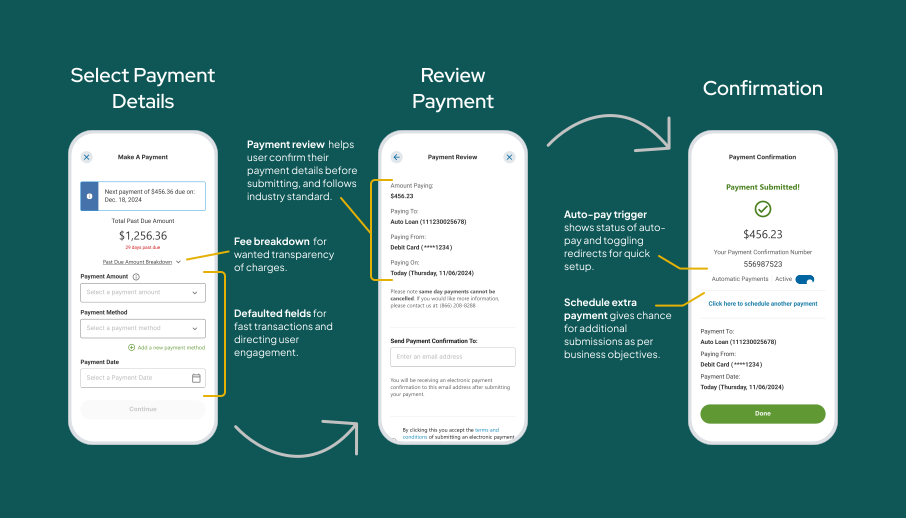
All competitors used a consistent 3-step pattern: Select Payment Details → Review Payment → Confirmation.
2
Single page selection
Unlike the desktop's multi-step approach, mobile experiences condensed payment options into a single page.
3
Smart defaults with easy editing
Competitors pre-filled payment details (like amount and date) but let users tap to customize if needed.
DESIGN
Building the Payment Experience
With research insights and payment flow patterns identified, I led the design of 10 screens across 3 mobile payment widgets that we built to make payments transparent, intuitive, and fast.
The payment flow
I structured the core experience around the industry-standard pattern customers already knew: Select → Review → Confirm. Within that familiar structure, I added features that solved the problems I had uncovered:
Fee breakdown transparency
A collapsible table showing exactly what customers owed and why.
Smart defaults
Pre-filled payment details (like "Total Past Due" amount auto-selected) with easy customization.
Actionable confirmation
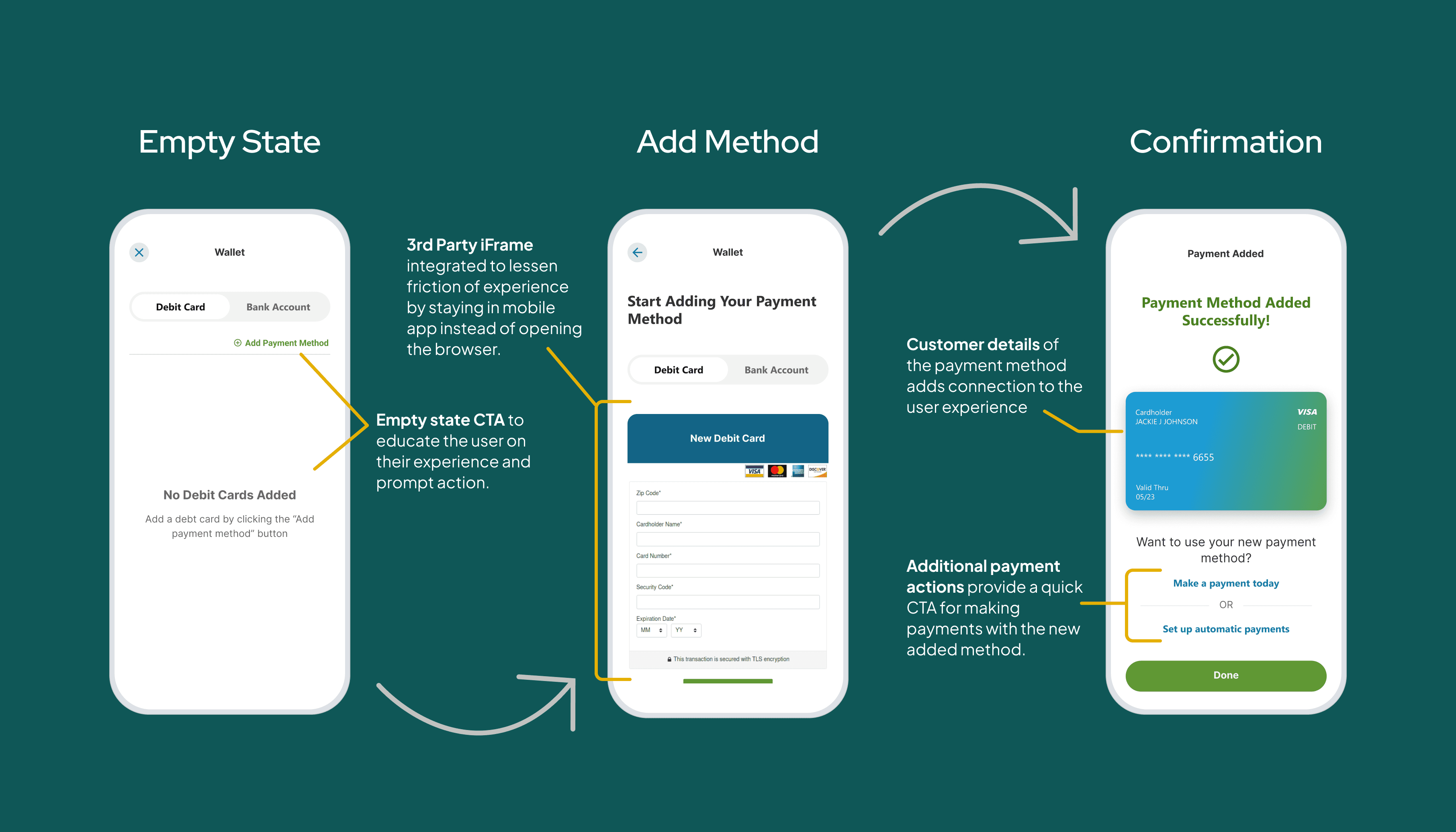
After payment, customers could schedule another payment or set up auto-pay directly from the success screen.
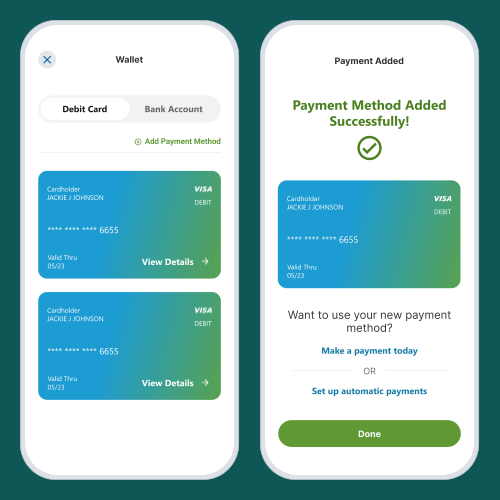
Digital wallet management
The most complex widget allowed customers to save, view, and manage payment methods. I designed visual card representations, detail views, and flows for adding or deleting payment methods — making it easy to see what was saved and take action quickly.
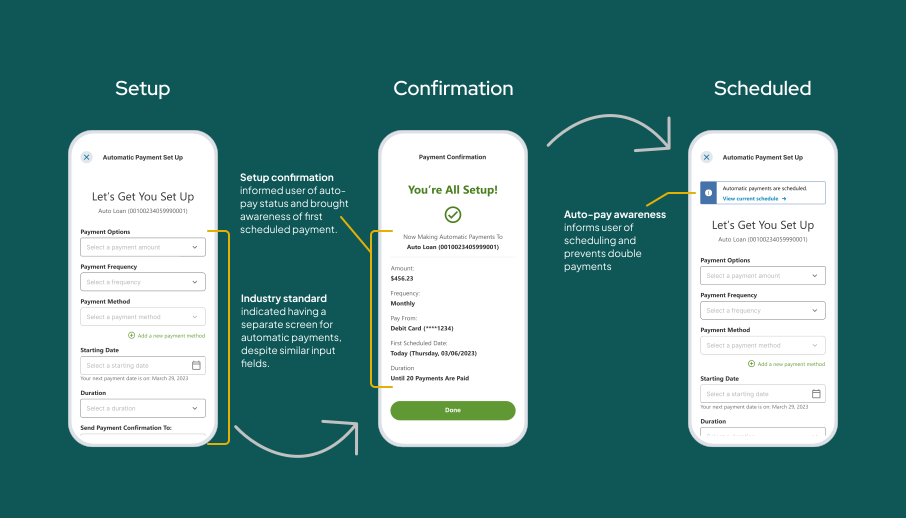
Automatic payments
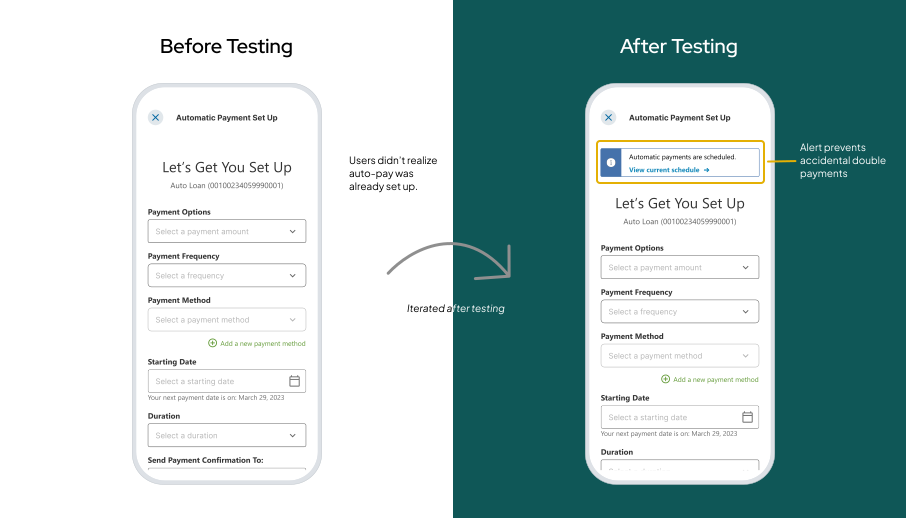
I designed an auto-pay widget where customers could set up and manage recurring payments. During testing, we discovered users weren't aware they already had auto-payments scheduled — leading to accidental double payments. To prevent further issues, I added a clickable alert to bring awareness and a redirect link for quick editing.
DEVELOPMENT
Bringing it to Life
Collaborating early and often
I made it a priority to bring developers and stakeholders into the design process early. Once a flow was ready, we'd review it together to confirm feasibility and catch potential issues before they became problems. This helped us ensure flexibility, quicker iterations, and avoid wasted work.
Working within constraints
As the designs evolved, we learned to work with real-world constraints:
Junior developers
With developers new to coding, annotations weren't always enough. I paired with them to code the front-end for 3 widgets, ensuring consistency and building their confidence.
Vendor limitations
We leaned heavily on the vendor's design system and existing components, which limited customization but ensured speed.
The pair-programming payoff
Coding alongside junior developers did more than ensure quality — it earned their trust. They started asking design questions earlier, we caught UI issues before they hit QA, and handoffs became smoother as the project progressed.

OUTCOMES
From Idea to Impact
We launched Crescent's first mobile app in 4 months — delivering a payment experience customers loved and stakeholders wanted more of.
No App Previously
4.9
Apple Store rating with 1.7k ratings given.
Current Design Not Impactful
Customers switched from legacy portal to mobile app in 2 months.
UX Not Involved
3
Additional projects and features requested design early.
Beyond the Metrics
This project sparked something bigger: it reshaped how Crescent built software. For the first time, user needs weren't an afterthought.
Stakeholders started requesting design involvement at project kickoff.
Developers began asking for UI feedback earlier in the process.
Leadership recognized the value of user-first thinking — making way for an additional widget and a major new project based on the success of this work.
This project didn't just solve a problem — it ignited a culture shift.
RETROSPECTIVE
What I Would Carry Forward
This project taught me how to design under pressure, collaborate with junior developers, and spark organizational change. Here's what I'd do differently next time:
1
Wireframes = speed, not slowdown
Even under tight timelines, low-fidelity drafts help test ideas faster and avoid costly rework. Next time, I'd carve out 2-3 days for rapid wireframing before committing to hi-fi.
2
Balance speed with space to think
Deadlines require speed, but the best design decisions came when I took time to consider different approaches. Next time, I'd design in smaller chunks to avoid rushing into solutions.
3
Design for all breakpoints, not just a few
Accounting for only 1-2 breakpoints led to rework. Next time, I'd map out responsive behavior across all screen sizes to avoid development inconsistencies.
4
Test with edge cases in mind
During testing, we discovered users didn't realize they already had auto-payments scheduled. This taught me to design for edge cases (like existing data) from the start, not just happy paths.
What came next
The success of this project led to a new challenge: designing a customer service application to help representatives view data and assist customers more efficiently during calls.
Solving a Historical Call Service Issue
From Cluttered to Simplified
Connect With Me
Thanks for looking through my portfolio! Stay connected - even if it's on social media, I enjoy growing my community.
692 LinkedIn connections and growing!
Need a freelancer?
I partner with progressive brands to bring meaningful ideas to life through purposeful digital transformation.